AI Image Generators: The Everyday Tools That Turn Descriptions into Pictures

The Evolution of Image Creation
Not long ago, anyone who needed a custom image had a pretty limited choice: hire a designer, slog through stock photo sites, or make do with some half-decent free photo that barely matched what you wanted. Now, all it takes is typing a quick description and pressing enter. That’s it. In a few seconds, you’ve got a brand-new image. AI image generators went from feeling like weird tech demos to something people just use without thinking—whether it’s for social media, work presentations, classroom slides, or just messing around with ideas before putting in serious effort.
How Diffusion Models Works:
Core Technology:
Most AI image generators rely on diffusion models, which are trained by taking real pictures, scrambling them into static noise, and learning how to reverse that process.
The Generation Process:
When you enter a prompt, the system starts with pure randomness and gradually erases the noise until a recognizable image takes shape.
Pattern Assembly:
The AI does not draw like a human; rather, it pieces together visual patterns and bits of information it learned from analyzing vast amounts of training images.
Unique Outputs:
Because every generation starts from a completely new scratch of random noise, you will never get the exact same picture twice, even when using the identical prompt.
Breaking Down Barriers for Everyone
It’s simple and pretty convenient. Now, a tiny online shop doesn’t need a pro photographer—just snap some product photos yourself. Students whip up diagrams for school without fuss. Content creators churn out quick thumbnails for YouTube or social posts. Marketers put together tons of ad versions, even when the money’s tight or deadlines loom. Honestly, the old hurdles are gone. You don’t need fancy tech skills or expensive tools anymore. It’s really just about how clearly you can explain what you’re looking for.
Famous Free AI Image Tools in 2026
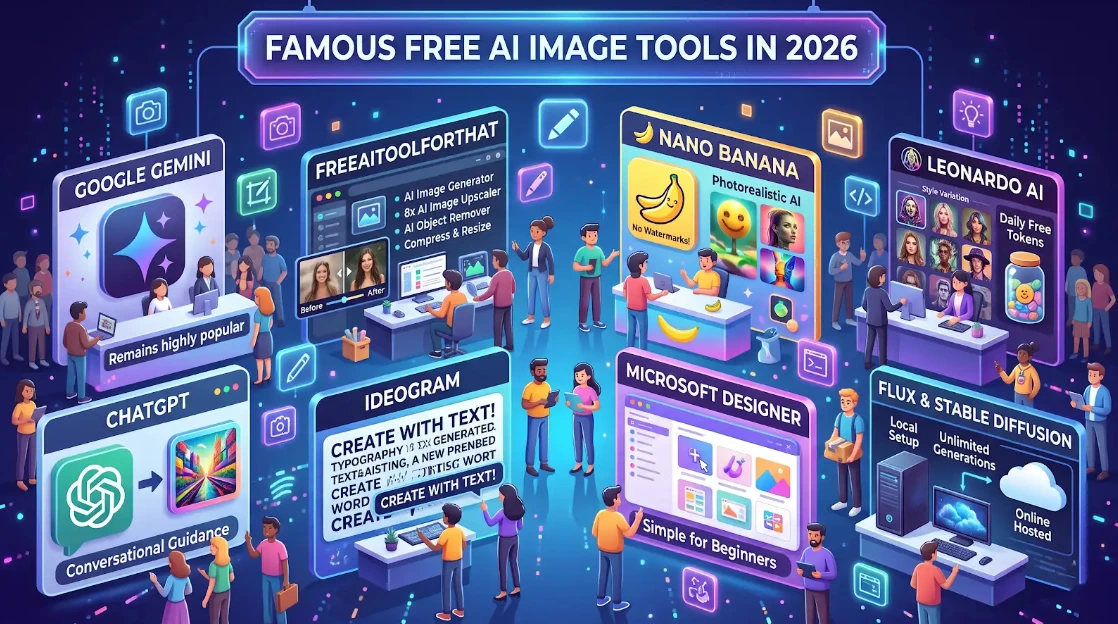
• Google Gemini: Remains highly popular and widely discussed.
• FreeAIToolForThat: Includes an AI Image Generator, 8x AI Image Upscaler for sharpening blurry photos, an AI Object remover to clear out unwanted elements or text, and a Standard quick-action tools like an Image Compressor, Resizer and a Before/After Video Maker for comparison sliders.
• Nano Banana: Generates photorealistic images without watermarks.
• Leonardo AI: Offers generous daily tokens and allows for extensive style customization.
• ChatGPT: Features sharp prompt comprehension and easy conversational guidance, though the free tier depletes quickly.
• Ideogram: The preferred tool for placing readable text into images.
• Microsoft Designer: The simplest entry point for beginners.
• FLUX & Stable Diffusion: Provide unlimited generations when set up locally on your computer (requires technical configuration), while online hosted versions offer an easier, setup-free alternative.
Understanding the True Cost of "Free"
Just keep in mind, “free” isn’t always truly free—and it’s always changing. Some tools slap watermarks on your images or make everything public, while others block you from using your work for business. Before you upload something to a client’s site or sell a product, take a minute to check those terms. It’s not exciting advice, but it saves a ton of trouble later. The Appeal of Browser-Based Tools
Lately, browser-based tools are taking off because they’re so straightforward. You can use a bunch of them right in your browser—no sign-ups, no tracking, with privacy as a big plus. No need to cough up an email address or mess around with big online libraries. Take freeaitoolforthat.com, for example. It offers an AI image generator (using Krea 2 Hugging Face Space) and a good mix of features: upscaling, an object remover, face blurring, basic resizing, and cropping.
The whole idea is fast one-off tasks. You keep your own files instead of loading them into someone else’s system. Most days, when you’re knocking out mockups, tidying up product photos, or just need a quick visual, these simple browser tools are enough. No need to open up bulky software like Photoshop or Illustrator.
Navigating Quality and Perfecting Prompts
Quality can bounce all over the place. Some models really nail photorealism and keep characters looking the same from image to image, and sometimes you get readable text. But hands? Complicated shapes? They’re still tough to get right. Don’t expect brand logos or details to look perfect, either—they often turn out strange. Here’s the trick: be particular with your prompts.
Describe the brightening, action, the camera viewpoint, reference styles, mood, and overall outlook. Forget about those basic phrases—say exactly what you have in your mind. Most of the time, you will get better results by crafting some images and modify your prompt each time, rather of expecting the first attempt to nail it.
Copyright Law and Legal Issues
Copyright law gets complicated fast. Right now, the U.S. Copyright Office says you can’t get copyright protection for images made entirely with AI from text prompts—only things created by real people count. Sure, many platforms will let you use these AI images for business, but that’s just a permission they grant you. It’s not real copyright, so other people can still copy your work. And if your image includes a familiar person, a brand, or a picture from a movie or book, you always need consent, no matter which AI you use. For fun, personal stuff, none of this usually matters. But if you’re doing anything professional, you want to be careful.
Privacy Considerations
Privacy First:
It is possible to have access to highly functional AI without compromising on data security.
Local First:
Most applications process files right inside your browser, keeping your data safely on your own computer.
Cloud Security:
Tasks that require more complex AI generation are processed through a safe API connection and are never saved to a database.
Get Professional Quality with No Worries:
Enjoy top-notch results without any concerns for the safety and destination of your files.
Transforming the Creative Workflow
The real change isn’t that these models spit out perfect art every time. The difference is, making a good image now takes almost no time or money. You can play around nonstop. Remember waiting days for a designer? Now someone can try five ideas before they even eat lunch. Small teams—no designer needed—keep their visuals interesting. In fact, students and teachers can bring new thoughts to life in class, instead of sticking to dusty notebooks or run-of-the-mill stock photos.
Conclusion: A Tool for Everyday Visuals
These tools would not replace good illustration, images, or true design work when you really need those skills. But if you need to turn a rough idea into something visual, they’re surprisingly useful.
For most day-to-day stuff—mockups, social media pictures, basic product shots—you can get by just fine with some decent browser tools and free online services. Really, just experiment with a few using the same prompt, pay attention to which ones feel right for your process, and make sure your prompts are clear enough to guide the AI. That’s usually all it takes.
Frequently Asked Questions (FAQs)
What is an AI image generator?
An AI image generator is a tool that turns a written description, or prompt, into an image. It can help create visuals for social media, presentations, classroom slides, product photos, mockups, and other everyday needs.How do AI image generators create images?
Many AI image generators use diffusion models. They begin with random noise and gradually remove that noise until a recognizable image takes shape, using visual patterns learned from training images.Can I use AI image generators for free?
Yes, several tools offer free access or free usage limits. However, the terms vary: some tools may add watermarks, make generated images public, limit usage, or restrict commercial use. Check each tool’s current terms before using an image professionally.Which free AI image generator should I choose?
The article highlights several options for different needs: FreeAIToolForThat and Google Gemini for prompt-based image creation, Ideogram for readable text in images, Leonardo AI for style customization, Microsoft Designer for beginners, and FLUX or Stable Diffusion for people comfortable with local setup. Features and free limits can change.Do I need to install software to generate AI images?
Not always. Browser-based tools let you create or edit images online without installing large applications. FLUX and Stable Diffusion can also be run locally, but that usually requires technical configuration.How can I get better results from an AI image generator?
Write a specific prompt. Describe the subject, action, lighting, camera viewpoint, visual style, mood, and overall look you want. Review the result and refine the prompt rather than expecting the first attempt to be perfect.Can AI image generators make mistakes?
Yes. Image quality can vary, and details such as hands, complicated shapes, brand logos, and small text may not look correct. You may need to generate several versions and adjust your prompt.Can I use AI-generated images for commercial purposes?
It depends on the platform’s terms and the content of the image. Some services allow commercial use, but permission to use an image does not necessarily mean the image is protected by copyright. Be especially careful with recognizable people, brands, and material from movies or books, and check the relevant rules before professional use.Are browser-based AI image tools private?
Privacy practices differ by tool. The article describes browser-based options that can process files locally and tools that send more complex tasks through an API. Before uploading sensitive material, review the tool’s privacy and data-handling terms rather than assuming every service works the same way.Will AI image generators replace designers?
The article presents these tools as useful for quick everyday visuals, mockups, and early ideas, rather than replacements for skilled illustration or design when professional expertise is needed.Ready to try our AI tools?
Experience the power of free, private AI tools running directly in your browser.
Explore All Tools