Free AI Humanizer: Make Machine Drafts Sound Like You

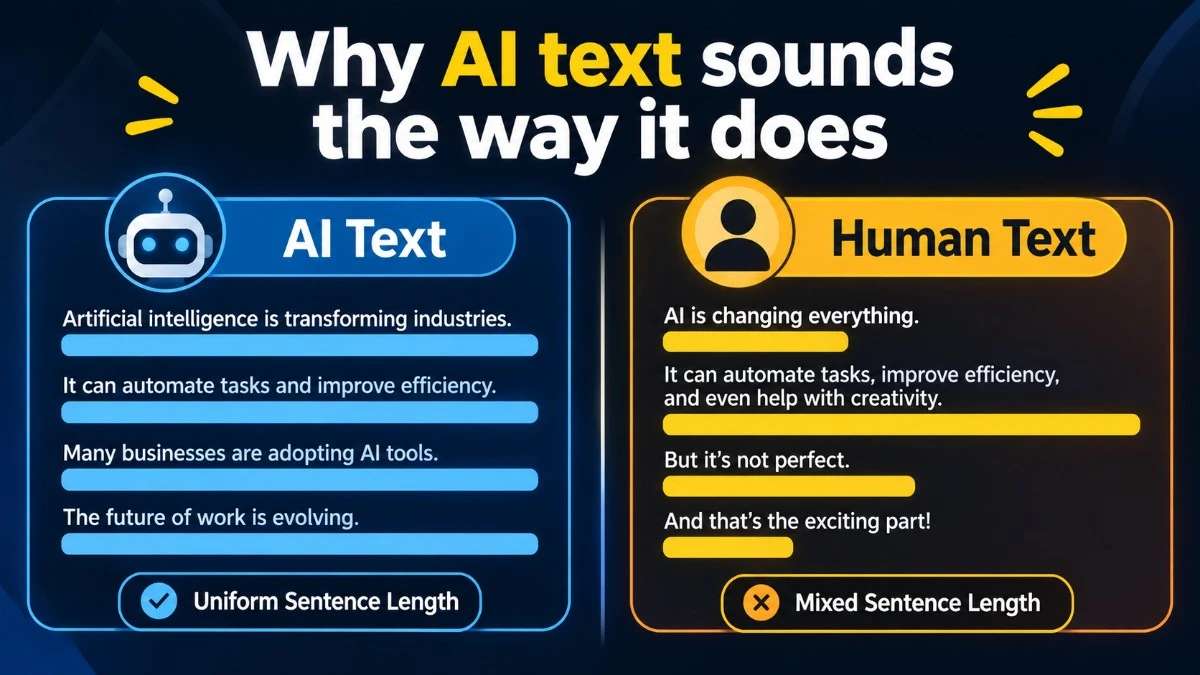
You type a prompt, hit enter, and ten seconds later there's a tidy draft on your screen. Tidy is the problem. Every sentence runs about the same length. Every paragraph opens the same way. Somewhere around the middle, "delve" shows up and refuses to leave.
Readers notice. Detectors notice too.
A free AI humanizer tries to close that gap. Below is what the Free AI Humanizer from Free AI Tool For That actually does, how I'd use it, and where it lets you down.
Why AI Text Sounds the Way It Does
Language models guess the next likely word, over and over. Likely words make smooth sentences. Smooth is safe, and safe gets dull fast. People don't write like that. We wander off, double back, and grab the odd word because it happens to be the right one.
A few habits give the game away:
- Same-length sentences: Count them. A lot of AI text sits between 18 and 22 words, line after line.
- Borrowed transitions: "Moreover," "Furthermore," and "In conclusion" do the heavy lifting.
- Fence-sitting: Plenty of "it is important to note," hardly any opinion.
- Neat little groups: Three bullets, three examples, a summary in three parts.
So, What Is This Tool?
It runs in your browser. You paste in a draft (or upload a .txt file), click once, and a rewritten version appears. That's the whole workflow.
The details worth knowing:
- No sign-up: Open the page and go.
- No usage cap: Run as much text as you want.
- No watermark on what comes out.
- English only, for now: The site says German, Dutch, and Tagalog are on the way.
Using It, Step by Step
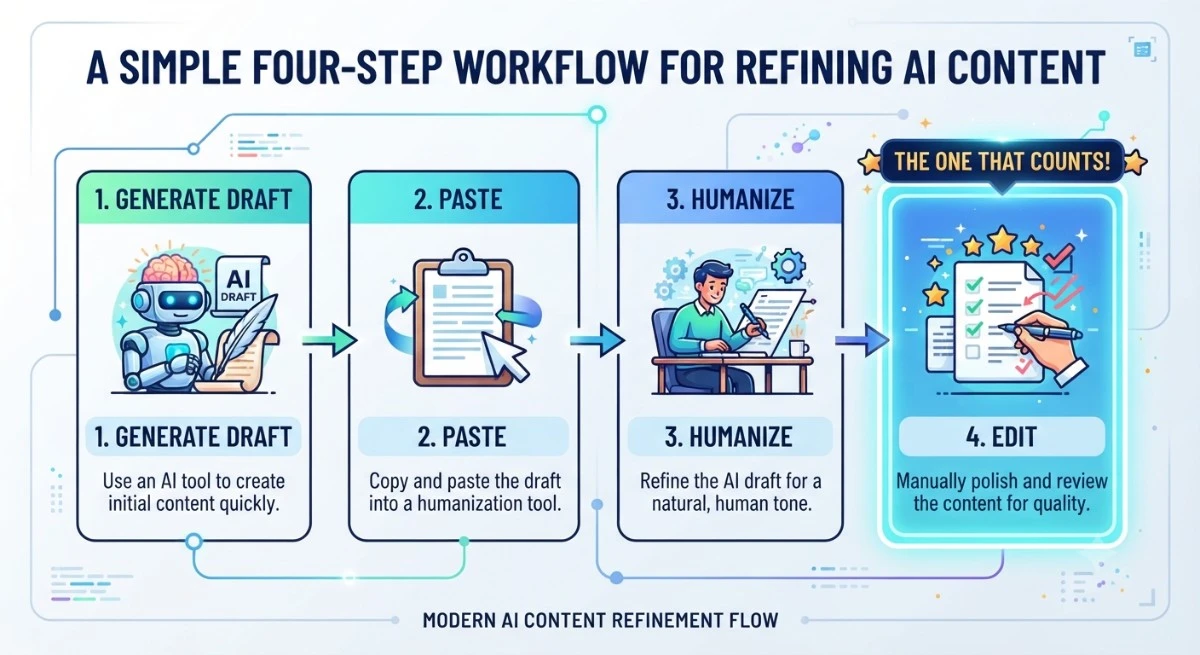
- Get a draft: Any AI tool will do.
- Paste it in: Drop the text into the input box or upload a .txt file.
- Hit "Humanize Text": The rewrite shows up in the result panel.
- Edit what you get: Read it through once, fix the odd bits, and put in your own details.
Privacy: Your Text Stays on Your Machine
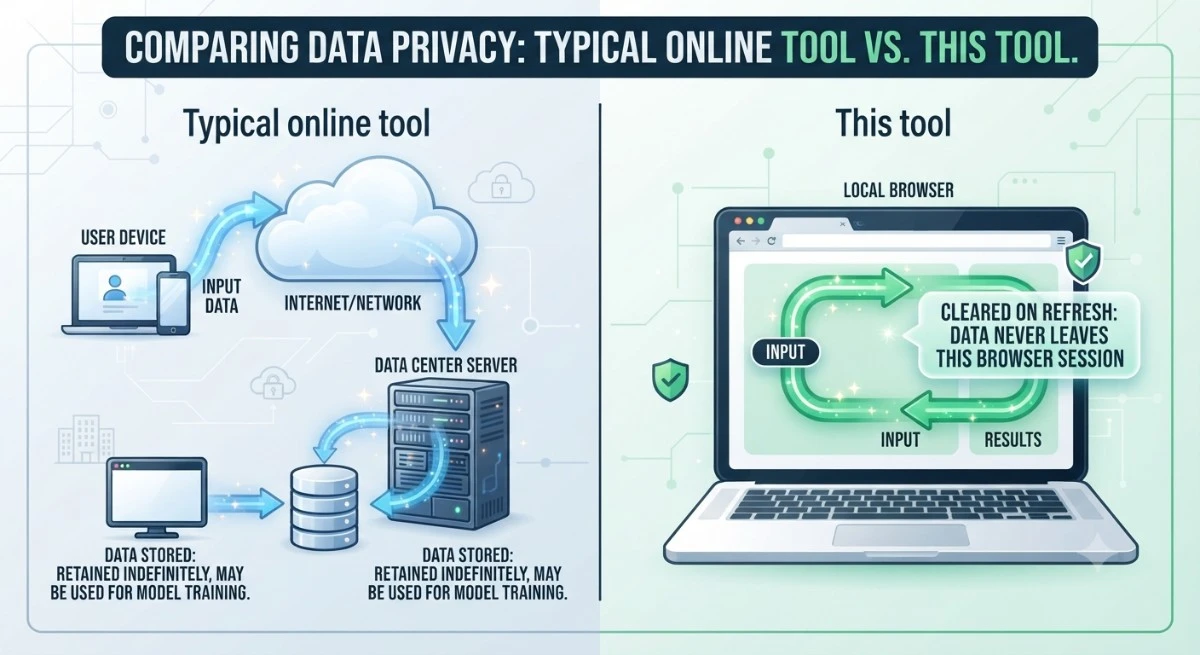
Most online writing tools ship your text off to a server. If you're handling client work, unpublished material, or an internal document, that should give you pause.
This one does things differently. The processing happens locally in your browser through WebAssembly.
According to the site, your text never reaches its servers, never gets used to train models, and disappears when you refresh the page.
For freelancers and agencies sitting on confidential drafts, that's a real point in its favor over cloud-based rivals. It also means the tool should keep working on a shaky connection once the page has loaded.
Who Benefits Most
- Bloggers and content writers: AI is handy for outlines and rough drafts. A humanizer can take the stiffness out before you do your own edit.
- SEO and marketing teams: When you publish at volume, drafts start to sound identical. Running them through a humanizer adds some variety, and that helps a brand voice stay recognizable.
- Students and researchers: It can turn a stiff paragraph into plainer language. Check your institution's rules on AI use first, though.
- People writing emails and reports: A pasted AI draft often reads far too formal. One quick pass can warm it up.
The Honest Part: What It Can and Can't Do
The site claims the tool can help text get past detectors such as GPTZero, Turnitin, and Originality.ai. I wouldn't lean on that promise.
Detectors are inconsistent. They flag human writing as AI and wave AI writing through, and their algorithms change all the time. Nobody can guarantee "100% undetectable." A rewrite that clears one checker today might fail another tomorrow.
There's a quality trade-off too. The tool uses a compact model so it can run inside a browser. That's what makes it fast and private.
It's also why it can sometimes flatten nuance, swap in clumsy words, or nudge the meaning off course. Compare the output with your original, especially when the content is technical, legal, or full of data.
One more thing. If your school, publisher, or employer bans AI-assisted writing, a humanizer won't fix that. Use it to make your writing more readable, not to hide where it came from.
Getting Better Results
- Work in chunks: A few paragraphs at a time beats dumping in a 3,000-word draft.
- Add specifics afterward: Names, numbers, local examples, and real opinions are what make writing feel human. No tool can invent your experience.
- Read it out loud: If you stumble on a sentence, rewrite it.
- Reshape it yourself: Join two short sentences. Split a long one. Cut the filler.
- Check the facts: Rewriting can change details, so verify anything that matters.
Final Thoughts
The Free AI Humanizer is a practical, no-cost way to take the stiffness out of an AI draft. Local processing, no limits, and no sign-up make it easy to try.
Use it as a first-pass editor. Keep your own judgment in charge. And don't count on it as a guaranteed way around detectors.
The best writing usually ends up a mix: AI for speed, you for the voice. Run your next draft through it and see how much of the robotic edge goes away.
Frequently Asked Questions
1. Is the Free AI Humanizer really free?
Yes. There's no sign-up, no credit system, and no stated usage limit. Since the processing happens in your browser, the site doesn't have server costs to pass on.2. Is my text private?
The site says your text is handled in your browser's memory and never uploaded. It also says inputs aren't used for training and get cleared when you refresh the page.3. Can it get past Turnitin or GPTZero?
It's built to make text read less like AI output, but no humanizer can promise a pass. Detectors differ and update often, so be skeptical of any guarantee and review the final text yourself.4. Does it work on text from ChatGPT, Claude, and Gemini?
Yes. It rewrites the text itself, so it doesn't matter which tool produced it.5. Does it support languages besides English?
Not yet. It's tuned for English today, and the site lists German, Dutch, and Tagalog as coming later.6. Will it change what my text means?
Occasionally, yes. Compact models sometimes swap words in ways that shift nuance. Compare the result with your original, particularly for technical or factual writing.7. Is it okay to use a humanizer for school or work?
That depends on your institution's or employer's policy. It's fine for polishing drafts where AI use is allowed. It shouldn't be used to conceal AI use where it's prohibited.Ready to try our AI tools?
Experience the power of free, private AI tools running directly in your browser.
Explore All Tools